posted August 17 2015
understanding ggplot: an example
If you use R, odds are good that you’ve also come across ggplot2, by Hadley Wickham. This wildly popular plotting package is one of the most useful tools in the entire R ecosystem. If it didn’t exist, I would have had to invent it (or a significantly inferior version of it). ggplot’s elegant, powerful syntax can turn you into a data vis wizard, if you know what you’re doing. It’s getting to “I know what I’m doing” that can be tough.
Earlier today, I came across a Bloomberg article on how more older drivers are staying on the road and becoming the auto industry’s fastest-growing demographic. It’s an interesting read, but what caught my attention was this figure:

From a data visualization standpoint, this plot is actually several flavors of weird and bad (more on that later), but suppose you find yourself enamored of its fun colors and jaunty angles, and maybe you want to see how much of this you can replicate purely with ggplot.
First thing’s first, download the data, which has just three columns: age.group, year, and value. Next we’ll calculate a marker for whether the number of drivers in an age group is increasing, as well as the actual percentage change:1
data.bloom <- ddply(data.bloom, .(age.group), mutate,
                    is.increasing = value[year == 2013] >= value[year == 2003],
                    percent = (value[year == 2013] - value[year == 2003]) / value[year == 2003] * 100
);
And now we’re ready to plot! Let’s get the basics going:
plot.bloom <- ggplot(data=data.bloom, aes(x = year)) +
  geom_ribbon(aes(ymin = 0, ymax = value)) +
  geom_point(aes(y = value)) +
  facet_wrap(facets = ~age.group, nrow = 2);
print(plot.bloom);
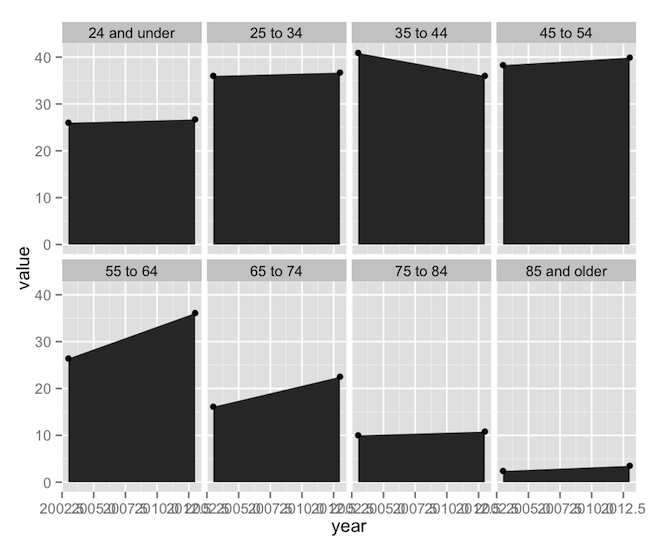
ggplot’s syntax often mystifies new users, so let’s go through it.
- Line 1 is the main call to ggplot. It’s what tells R that we’re building a new ggplot object. The
ggplot()function really only needs two arguments: a dataset (self-explanatory) and a set of aesthetics, defined in the mysteriousaes()function called inside ofggplot(). ggplot will attempt to go through each individual row of the dataset and put it on our plot. The aesthetics defined inaes()tell ggplot which columns define which properties of the plot. In this main call toaes(), I’ve only specified that “year” should go on the x-axis. Notice that I can refer to the “year” column by name alone; no quotes, no reference to its parent data frame. Theaes()function implicitly knows about its associated dataset. This aesthetic mapping will then trickle down to every subsequent piece of the plot (unless I change the aesthetic mapping later on down the line). - Line 2 is our first geom, which defines a graphical object. In this case, I’m using
geom_ribbon(), which is useful for building polygonal shapes such as shaded regions, error bars, highlights, and so on. Thegeom_ribbon()function is pretty smart; it wants you to define “ymin”, “ymax”, “xmin”, and “xmax”, but if you give it just “x”, it’ll use that value for the min and max values. Since we already defined “x” up inggplot(), we just have to give it “ymin” and “ymax”. Here I’m saying that I want “ymin” to always be 0, and “ymax” to take on the data values. - Line 3 calls
geom_point(), and it does what it says on the tin. It already has “x” from the call toggplot(), and it needs a “y”. In this case, that’s just “value” again. - Line 4 calls
facet_wrap(). Faceting, an implementation of the small multiples technique, is perhaps the most powerful feature of ggplot. Faceting makes it possible to take a plot and split it into smaller sub-plots defined by some other factor or combination of factors. Our call tofacet_wrap()simply says to split the plot up by “age.group”, and arrange the resulting set of sub-plots into exactly 2 rows.2
Four lines of code3, and we’re 90% of the way there. This is the point at which you’d call over your boss to show him your new, exciting, preliminary finding. But you wouldn’t call over your boss’s boss. The plot needs more work first. The labeling on the x-axis is screwy and there’s a distinct lack of eye-catching color here. Let’s fix that.
plot.bloom <- ggplot(data=data.bloom, aes(x = year)) +
  geom_ribbon(aes(ymin = 0, ymax = value, fill = is.increasing)) +
  geom_point(aes(y = value)) +
  facet_wrap(facets = ~age.group, nrow = 2, scales = 'free') +
  scale_x_continuous(breaks = unique(data.bloom$year), expand=c(0.16, 0)) +
  scale_fill_manual(values=c('TRUE'='#99e5e5', 'FALSE'='#f27595'));
print(plot.bloom);
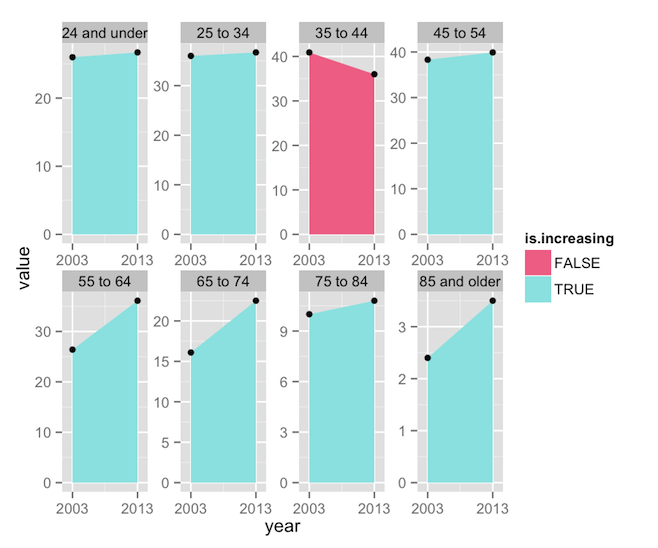
Here are the changes I’ve made:
- Line 2 now adds
fill = is.increasingto the aesthetics. This will color the polygons according to whether “is.increasing” is TRUE or FALSE. - Line 6’s call to
scale_fill_manual()tells ggplot that the “fill” aesthetic is going to be controlled manually. While there a number of built-in color scales,such as scale_fill_brewer()orscale_fill_grey(),scale_fill_manual()simply allows us to define our own colors. In this case, I’ve picked the specific colors from the Bloomberg figure, and mapped them to the two possible values in the “is.increasing” column. - Line 5 calls
scale_x_continuous(). Since our “year” column is numeric data, ggplot assumes that 2003 and 2013 are just two points on a line (you can see lots of intermediate values in the plot above, as ggplot attempted to create neatly spaced tick marks). One way to clear up the labels would be to convert the year column to a factor, and then ggplot would label only the values that exist in the dataset. Another way would be to convert the year column to Date objects, and usescale_x_date(), but that’s overkill here. Instead, I’ve simply used the “breaks” argument to restrict labeling to the two values found in the dataset. The two-element vector being sent to “expand” tells ggplot how much padding to add to the ends of the x-axis. The first value defines a percentage value (16% here), while the second would add some raw value (here, some number of years). The default isc(0.04, 0), so I’ve essentially just increased the padding a little. - Lastly, Line 4 adds
scales = 'free'tofacet_wrap(). In the previous plot, notice that each facet shared the same axes, and axis values were only written on the far left and bottom of the plot. This is efficient and readable, but it’s not how the Bloomberg plot does things. For the sake of replication, we need x-axis labels on each facet.
We’re getting closer, but these changes have produced some undesirable effects. The use of a fill aesthetic has caused ggplot to helpfully add a legend, which we don’t want, while the use of scales = 'free' has caused each facet to plot the data against its own set of y-axis limits, losing the nice comparable scaling we had before. We can keep the individual axes and the unified scaling with one addition:
plot.bloom <- ggplot(data=data.bloom, aes(x = year)) +
  geom_ribbon(aes(ymin = 0, ymax = value, fill = is.increasing)) +
  geom_point(aes(y = value)) +
  facet_wrap(facets = ~age.group, nrow = 2, scales = 'free') +
  scale_x_continuous(breaks = unique(data.bloom$year), expand=c(0.16, 0)) +
  scale_y_continuous(limits=c(0, 50), expand=c(0, 0)) +
  scale_fill_manual(values=c('TRUE'='#99e5e5', 'FALSE'='#f27595'));
print(plot.bloom);

Line 6 establishes explicit limits for the y-axes (ranging from 0 to 50), and knocks out the padding entirely, so that the data touches the y-axis, as in the Bloomberg plot. But wait! The Bloomberg figure also prints the value of each data point, and includes the written percentage as well. Two calls to geom_text() can get that done:
plot.bloom <- ggplot(data=data.bloom, aes(x = year)) +
  geom_ribbon(aes(ymin = 0, ymax = value, fill = is.increasing)) +
  geom_point(aes(y = value)) +
  geom_text(aes(label = sprintf('%0.1f', value), y = value), vjust = -1, size=3) +
  geom_text(subset=.(year == 2013), aes(label = sprintf('%+0.1f%%', percent)), x = 2008, y = 0, vjust = -1, fontface = 'bold', size=3) +
  facet_wrap(facets = ~age.group, nrow = 2, scales = 'free') +
  scale_x_continuous(breaks = unique(data.bloom$year), expand=c(0.16, 0)) +
  scale_y_continuous(limits=c(0, 50), expand=c(0, 0)) +
  scale_fill_manual(values=c('TRUE'='#99e5e5', 'FALSE'='#f27595'));
print(plot.bloom);

Lines 4 and 5 accomplish similar things, so let’s just focus on line 5:
- Notice that the “label” argument inside
aes()invokessprintf(), which is a very handy way of ensuring that the percentage values are all neatly rounded to one decimal place and attached to a percent symbol. It’s possible to do these types of transformations within ggplot, thus saving you the trouble of having to create transforms within the dataset itself. - “x” is set to 2008, which is halfway between 2003 and 2013, thus ensuring that the label appears at the horizontal center of the plot. Note that “x” is set outside of
aes(). You can do that if you’re setting an aesthetic to a single value. - Likewise, “y” is always 0, the baseline of the plot, and a “vjust” of -1 will set the text slightly above that baseline.
- The “fontface” and “size” attributes should be fairly self-explanatory.
- Lastly, remember when I said that ggplot wants to plot every row in your dataset? This means that ggplot would print the percentage values twice, right on top of each other, since they appear twice (one per age group). The “subset” parameter ensures that I’m only pulling the labels once.
Finally, the rest is cosmetic:
plot.bloom <- ggplot(data=data.bloom, aes(x = year)) +
  geom_ribbon(aes(ymin = 0, ymax = value, fill = is.increasing)) +
  geom_point(color='white', size=3, aes(y = value)) +
  geom_point(color='black', size=2, aes(y = value)) +
  geom_text(aes(label = sprintf('%0.1f', value), y = value), vjust = -1, size=3) +
  geom_text(subset=.(year == 2013), aes(label = sprintf('%+0.1f%%', percent)), x = 2008, y = 0, vjust = -1, fontface = 'bold', size=3) +
  facet_wrap(facets = ~age.group, nrow = 2, scales = 'free') +
  scale_x_continuous(breaks = unique(data.bloom$year), expand=c(0.16, 0)) +
  scale_y_continuous(limits=c(0, 50), expand=c(0, 0)) +
  scale_fill_manual(values=c('TRUE'='#99e5e5', 'FALSE'='#f27595')) +
  labs(x=NULL, y=NULL) +
  theme_classic() + theme(legend.position='none',
                          axis.line.y=element_blank(),
                          axis.ticks.y=element_blank(),
                          axis.text.y=element_blank(),
                          axis.text.x=element_text(color='#aaaaaa'),
                          strip.text=element_text(face='bold'),
                          strip.background=element_rect(fill='#eeeeee', color=NA),
                          panel.margin.x = unit(0.25, 'in'),
                          panel.margin.y = unit(0.25, 'in')
  );
print(plot.bloom);

- Lines 3 and 4 create two duplicate sets of points, in black and white, thus creating a white outline around the points.
- Line 11 turns off the axis labeling.
- Line 12 tells ggplot to use its built-in “classic” theme, which features a white background and no gridlines, thus saving us some typing in
theme(). - Lines 12-20 are just one big adventure in the aforementioned
theme(), which allows us to control the style of the plot. ggplot builds everything out of some basic theme elements, includingelement_rect(),element_text(), andelement_line(). Setting any parameter of the theme toelement_blank()removes that element from the plot itself, automatically re-arranging the remaining elements to use the available space.4
As far as I’m aware, this is as close as you can get to reproducing the Bloomberg plot without resorting to image editing software. ggplot can’t color facet labels individually (notice that in the Bloomberg version, the labels for the two oldest age groups are a different color than the rest). While I could muck around with arrows and label positioning for the percentage values, it would involve a lot of finicky trial and error, and generally isn’t worth the trouble.
So, we’ve done it. We’ve replicated this plot, which is horrible for the following reasons:
- The primary data are redundantly represented by three different elements: the colored polygons, the data points, and the data labels.
- Percentage change is represented by two separate elements: the color of the polygon and the printed label.
- The repetition of the axis labels is unnecessary.
- Splitting the pairs of points into a series of eight sub-plots obscures the relationship between age group and the number of active drivers. There’s a lot of empty space between the meaningful data, and the arrangement of sub-plots into two rows makes the age relationship harder to examine.
Using the same dataset, one could write this code:
plot.line <- ggplot(data=data.bloom, aes(x = age.group, y = value, color = as.factor(year))) +
    geom_line(aes(group = year)) +
    geom_point(size = 5.5, color = 'white') +
    geom_point(size = 4) +
    geom_text(aes(label=sprintf('%+0.1f%%', percent), color = is.increasing), y = -Inf, vjust = -1, size=3, show_guides=F) +
    geom_text(data=data.frame(year=c('2003', '\n2013')), aes(label=year), x=Inf, y = Inf, hjust=1, vjust=1) +
    scale_y_continuous(limits = c(0, 45)) +
    labs(x = 'Age Group', y = 'Number of Licensed Drivers (millions)') +
    scale_color_manual(values = c('FALSE'='#f00e48', 'TRUE'='#24a57c', '2003'='lightblue', '2013'='orange', '\n2013'='orange')) +
    theme_classic() + theme(legend.position = 'none',
                            axis.line = element_line(color='#999999'),
                            axis.ticks = element_line(color='#999999'),
                            axis.text.x = element_text(angle=45, hjust=1, vjust=1)
                        );
print(plot.line)
And produce this plot:

You could argue with some of the choices I’ve made here. For example, I’m still using points and lines to encode the same data. But I tend to subscribe to Robert Kosara’s definition of chart junk, which states that, “chart junk is any element of a chart that does not contribute to clarifying the intended message.” Here, the lines serve to remind the audience that the data are on a rough age continuum, while the points clarify which parts are real data and which are interpolation. I’ve also added color to the percentage change values, as I feel it’s important to highlight the one age group that is experiencing a decrease in licensure. Eagle-eyed readers will probably notice that I’m abusing ggplot a little, in that I’ve supressed the automated legend and am using geom_text() to create a custom legend of colored text (and the tricks I had to pull in scale_color_manual() are just weird).5
So what have we learned about ggplot? Look at how much explaining I had to do after each piece of code. This tells you that ggplot packs an awful lot of power into a few commands. A lot of that power comes from the things ggplot does implicitly, like establishing uniform axis limits across facets and building sensible axis labels based on the type of data used for the “x” and “y” aesthetics. Notice that ggplot even arranged the facets in the correct order.6 At the same time, ggplot allows for a lot of explicit control through the various scale() commands or theme(). The key to mastering ggplot is understanding how the system “thinks” about your data, and what it will try do for you. Lastly, notice that I was able to cook up a basic visualization of the data with just a few succinct lines of code, and gradually build the visualization’s complexity, iterating its design until I arrived at the presentation I wanted. This is a powerful feature, and one ideal for data exploration.
Feel free to grab the data and R code for this project.
-
We will, of course, be using plyr, another indispensible tool from the mind of Dr. Wickham. In this case, we use
mutate()in the call toddply()to add two new columns to the dataset (which I’m calling “data.bloom”). For each age group, calculate whether the value increases from 2003 to 2013 (“is.increasing”), and the percentage change (“percent”). ↩ -
Note that
facet_wrap()andfacet_grid()use an elegant formula interface for defining facets, of the formrows ~ columns. In this case, I only need to define either the rows or the columns. But in another dataset I could facet, say,age.group + income ~ gender. ↩ -
Technically everything before
print()is a single line of code, and I’m inserting line breaks for readability (notice the+signs at the end of each line, which connect all of the ggplot commands). ↩ -
ggplot’s sensible way of handling the automatic layout and scaling of plot elements is half the reason I prefer it over the base plotting system. ↩
-
And notice my use of
y = -Infin the call togeom_text(). This tells ggplot to place the text at the minimum of the y-axis, whatever that might turn out to be, a very useful feature that is documented nowhere. ↩ -
Really, we just got lucky there. When you are faceting based on character data (as we are here), ggplot attempts to arrange facets alphabetically, which works to our favor in this case. If you needed to place the facets in an arbitrary order, your best bet would be to convert your faceting columns into ordered factors, in which case ggplot will place the facets using the underlying order. ↩
posted December 9 2014
the first 90%
I work with lots of data. Not what you’d call “big data”, at least not technically, but maybe “biggish”. More than enough that Excel would crash just trying to open the dataset, assuming you were foolish enough to try. The amount of data is voluminous enough, and the relationship between the raw data and what you’re trying to analyze complex enough, that you need pretty decent data management chops to even access it correctly. But let’s say you have accessed it correctly. Now you can proceed to perform your analysis, make data visaulizations, and be a sorcerer of the digital age. Right?
Wrong. You left out the most important step: getting your data into the right format, making sure each data point has all the right labels in the right places to allow you to proceed to the real science. Cleaning data—that is, pulling in the unprocessed data, transforming it, rearranging it, relabeling it, discarding garbage, and otherwise getting it into a format that will play nicely with your analysis tools—is easily 90% of the job.
Let me give you an example.

This is a plot of the hours of daylight (sunset time subtracted from sunrise time) that Boston, Massachusetts received throughout 2014. I got the data from the US Naval Observatory after reading this post about the merits of Daylight Savings Time. Request a data file for any location in the US, and you’ll find it looks like this (scroll the box rightward to see the whole thing):
             o  ,    o  ,                                BOSTON, MASSACHUSETTS                         Astronomical Applications Dept.
Location: W071 05, N42 19                          Rise and Set for the Sun for 2014                   U. S. Naval Observatory
                                                                                                       Washington, DC  20392-5420
                                                         Eastern Standard Time


       Jan.       Feb.       Mar.       Apr.       May        June       July       Aug.       Sept.      Oct.       Nov.       Dec.
Day Rise  Set  Rise  Set  Rise  Set  Rise  Set  Rise  Set  Rise  Set  Rise  Set  Rise  Set  Rise  Set  Rise  Set  Rise  Set  Rise  Set
     h m  h m   h m  h m   h m  h m   h m  h m   h m  h m   h m  h m   h m  h m   h m  h m   h m  h m   h m  h m   h m  h m   h m  h m
01  0713 1623  0658 1659  0620 1734  0527 1810  0440 1844  0410 1914  0411 1925  0437 1904  0510 1818  0541 1726  0618 1638  0654 1613
02  0714 1624  0657 1700  0618 1735  0525 1811  0438 1845  0410 1915  0412 1925  0438 1903  0511 1817  0543 1724  0619 1637  0655 1613
03  0714 1624  0656 1701  0616 1737  0524 1812  0437 1846  0409 1916  0413 1924  0439 1901  0512 1815  0544 1722  0620 1635  0656 1612
04  0714 1625  0655 1702  0615 1738  0522 1814  0436 1847  0409 1917  0413 1924  0440 1900  0513 1813  0545 1721  0621 1634  0657 1612
05  0713 1626  0653 1704  0613 1739  0520 1815  0435 1848  0409 1917  0414 1924  0441 1859  0514 1811  0546 1719  0623 1633  0658 1612
06  0713 1627  0652 1705  0612 1740  0518 1816  0433 1849  0408 1918  0414 1924  0442 1858  0515 1810  0547 1717  0624 1632  0659 1612
07  0713 1628  0651 1706  0610 1741  0517 1817  0432 1850  0408 1919  0415 1923  0443 1856  0516 1808  0548 1716  0625 1631  0700 1612
08  0713 1629  0650 1708  0608 1743  0515 1818  0431 1852  0408 1919  0416 1923  0444 1855  0517 1806  0549 1714  0626 1629  0701 1612
09  0713 1630  0649 1709  0607 1744  0513 1819  0430 1853  0408 1920  0416 1922  0445 1854  0518 1805  0550 1712  0628 1628  0702 1612
10  0713 1632  0647 1710  0605 1745  0512 1820  0428 1854  0407 1920  0417 1922  0446 1852  0519 1803  0551 1711  0629 1627  0702 1612
11  0712 1633  0646 1712  0603 1746  0510 1821  0427 1855  0407 1921  0418 1921  0447 1851  0520 1801  0553 1709  0630 1626  0703 1612
12  0712 1634  0645 1713  0601 1747  0508 1823  0426 1856  0407 1921  0419 1921  0448 1850  0521 1759  0554 1707  0631 1625  0704 1612
13  0712 1635  0644 1714  0600 1749  0507 1824  0425 1857  0407 1922  0419 1920  0450 1848  0522 1758  0555 1706  0633 1624  0705 1612
14  0711 1636  0642 1715  0558 1750  0505 1825  0424 1858  0407 1922  0420 1920  0451 1847  0523 1756  0556 1704  0634 1623  0706 1612
15  0711 1637  0641 1717  0556 1751  0504 1826  0423 1859  0407 1923  0421 1919  0452 1845  0524 1754  0557 1702  0635 1622  0706 1613
16  0710 1638  0639 1718  0555 1752  0502 1827  0422 1900  0407 1923  0422 1919  0453 1844  0525 1752  0558 1701  0636 1622  0707 1613
17  0710 1640  0638 1719  0553 1753  0500 1828  0421 1901  0407 1923  0423 1918  0454 1842  0526 1751  0559 1659  0637 1621  0708 1613
18  0709 1641  0637 1721  0551 1754  0459 1829  0420 1902  0407 1924  0424 1917  0455 1841  0527 1749  0601 1658  0639 1620  0708 1614
19  0709 1642  0635 1722  0549 1755  0457 1830  0419 1903  0407 1924  0424 1916  0456 1839  0529 1747  0602 1656  0640 1619  0709 1614
20  0708 1643  0634 1723  0548 1757  0456 1832  0418 1904  0408 1924  0425 1916  0457 1838  0530 1745  0603 1655  0641 1618  0709 1614
21  0707 1644  0632 1724  0546 1758  0454 1833  0418 1905  0408 1925  0426 1915  0458 1836  0531 1743  0604 1653  0642 1618  0710 1615
22  0707 1646  0631 1726  0544 1759  0453 1834  0417 1906  0408 1925  0427 1914  0459 1835  0532 1742  0605 1652  0644 1617  0711 1615
23  0706 1647  0629 1727  0543 1800  0451 1835  0416 1907  0408 1925  0428 1913  0500 1833  0533 1740  0607 1650  0645 1617  0711 1616
24  0705 1648  0628 1728  0541 1801  0450 1836  0415 1908  0409 1925  0429 1912  0501 1832  0534 1738  0608 1649  0646 1616  0711 1617
25  0704 1650  0626 1729  0539 1802  0448 1837  0414 1909  0409 1925  0430 1911  0502 1830  0535 1736  0609 1647  0647 1615  0712 1617
26  0704 1651  0624 1731  0537 1803  0447 1838  0414 1910  0409 1925  0431 1910  0503 1828  0536 1735  0610 1646  0648 1615  0712 1618
27  0703 1652  0623 1732  0536 1805  0445 1839  0413 1910  0410 1925  0432 1909  0504 1827  0537 1733  0611 1644  0649 1614  0712 1619
28  0702 1653  0621 1733  0534 1806  0444 1841  0412 1911  0410 1925  0433 1908  0505 1825  0538 1731  0613 1643  0650 1614  0713 1619
29  0701 1655             0532 1807  0443 1842  0412 1912  0411 1925  0434 1907  0506 1823  0539 1729  0614 1642  0652 1614  0713 1620
30  0700 1656             0530 1808  0441 1843  0411 1913  0411 1925  0435 1906  0507 1822  0540 1728  0615 1640  0653 1613  0713 1621
31  0659 1657             0529 1809             0411 1914             0436 1905  0509 1820             0616 1639             0713 1622

                                             Add one hour for daylight time, if and when in use.
Getting that plot out of this data turns out to be a little tricky, and most of the trick is in the import and cleanup phases. Right now, the data are arranged such that the day of the month is on the rows, while the month, hour, minute, and sunrise/sunset label are on the columns. This is often called “wide” data, which is easy to look at, but usually hard to work with. Our goal is to create a “long” dataset in which each row holds a single timestamp corresponding to one day’s sunrise or sunset (essentially, two rows per day). I’m going to show you how to do it using R. You’ll also need the following R packages: reshape2, plyr, and lubridate.
First things first, we need to import the data, ideally so that each meaningful number (the hours and minutes for each day of the year) ends up in a neat column. While the double-nested headers are unfortunate (hour and minute are nested within sunrise/sunset, which are nested within month), at least the data follow a nice fixed-width format, with each column ending after a predictable number of characters. R happens to have a handy read.fwf function, which is specialized for reading in these types of files.
data.raw <- read.fwf(
  file='Boston Daylight Data 2014.txt',
  skip=9,
  nrows=31,
  colClasses='numeric',
  strip.white=T,
  widths=c(2, rep(c(4, 2, 3, 2), 12))
);
The read.fwf command accomplishes a lot, so I’ve spread its arguments out over several lines. I’m telling the function to read in the file, skip its first nine rows (none of which contain data), read exactly the next 31, make sure to import all the columns as numbers (not text strings), strip out any extra whitespace, and lastly, how many characters wide each column should be. This produces a dataset that looks like this (I’m cutting out a lot of the data, but there are a total of 49 columns and 31 rows):
 V1 V2 V3 V4 V5 V6 V7 V8 V9 V10 V11 V12 V13 V14 V15 V16 V17 V18 V19 V20
  1  7 13 16 23  6 58 16 59   6  20  17  34   5  27  18  10   4  40  18
  2  7 14 16 24  6 57 17  0   6  18  17  35   5  25  18  11   4  38  18
  3  7 14 16 24  6 56 17  1   6  16  17  37   5  24  18  12   4  37  18
  4  7 14 16 25  6 55 17  2   6  15  17  38   5  22  18  14   4  36  18
  5  7 13 16 26  6 53 17  4   6  13  17  39   5  20  18  15   4  35  18
  6  7 13 16 27  6 52 17  5   6  12  17  40   5  18  18  16   4  33  18
Now we just need to name the columns:
colnames(data.raw) <- c('day', paste(rep(month.abb, each=4), rep(c('rise', 'set'), each=2), c('hour', 'minute')));
This is a somewhat confusing use of the paste function, but basically I’m creating a vector of names: the first one is “day”, followed by names that follow the convention “Month rise/set hour/minute” (for example, “Jan rise hour”). Creating the labels at this stage saves us the trouble of having to extract them later.1 Our next step is to melt the dataset.
data.daylight <- melt(data.raw, id.vars='day');
By default, melt wants to reduce a dataset to just two columns: “variable” and “value” (“variable” becomes a column containing the dataset’s former column names, and “value” stores their corresponding values). The columns specified in id.vars are preserved in the new data frame, and are not melted into the “variable” column. So now our dataset looks like this:
 day      variable value
   1 Jan rise hour     7
   2 Jan rise hour     7
   3 Jan rise hour     7
   4 Jan rise hour     7
   5 Jan rise hour     7
   6 Jan rise hour     7
Now I want to take my “variable” column and split it into three new columns: month, event (sunrise/sunset), and time (hour/minute). This is easily done with colsplit. Note that I’m combining it with cbind, so that I can attach the new columns to my dataset without creating a temporary variable.
data.daylight <- cbind(data.daylight, colsplit(data.daylight$variable, ' ', c('month', 'event', 'time')));
Which makes the data look like this:
 day      variable value month event time
   1 Jan rise hour     7   Jan  rise hour
   2 Jan rise hour     7   Jan  rise hour
   3 Jan rise hour     7   Jan  rise hour
   4 Jan rise hour     7   Jan  rise hour
   5 Jan rise hour     7   Jan  rise hour
   6 Jan rise hour     7   Jan  rise hour
We’re nearly there. All that’s left is to get each event’s hour and minute into the same row. As near as I can tell, there’s no better way to do it than with the handy dcast function. With this function, I’m saying that “month”, “day”, and “event” should define the rows, while the different values stored in “time” should form new columns.
data.daylight <- dcast(data.daylight, month + day + event ~ time);
 month day event hour minute
   Apr   1  rise    5     27
   Apr   1   set   18     10
   Apr   2  rise    5     25
   Apr   2   set   18     11
   Apr   3  rise    5     24
   Apr   3   set   18     12
From importing the data to this use of dcast, I’ve only written five lines of code. Now would be a great time to scroll back up and remember how the data looked originally. I’ll wait.
And that’s what I call “the first 90%”. The data are now in a highly flexible “long” format, and can be used with ease. For example, say we wanted to a) convert the “month” and “day” columns into proper Date data, which will make plotting much easier, and b) calculate the minute of the day at which the sunrise/sunset event occurred. Enter mutate, the easiest way to do this kind of transformation (with a call to lubridate’s ymd function to turn strings of numbers into Dates):
data.daylight <- mutate(data.daylight,
                      date=ymd(paste('2014', month, day)),
                      event.minute=hour * 60 + minute);
 month day event hour minute       date event.minute
   Apr   1  rise    5     27 2014-04-01          327
   Apr   1   set   18     10 2014-04-01         1090
   Apr   2  rise    5     25 2014-04-02          325
   Apr   2   set   18     11 2014-04-02         1091
   Apr   3  rise    5     24 2014-04-03          324
   Apr   3   set   18     12 2014-04-03         1092
Think about how tedious and error-prone it would have been to create the equivalent of the “date” and “event.minute” columns with the data as originally formatted. But now we’re getting into what I call “the other 90%”, which is another story for another time.
-
There a lot of different ways to skin a cat in R, and therefore lots of different ways you might have generated and assigned these labels. In fact, there are lots of ways to do almost anything in R. Before I knew about
read.fwf, I usedreadLinesand some clever regular expression magic to separate out the time values. Trust me,read.fwfis much easier. ↩
posted July 27 2014
the tardis top ten: human nature / the family of blood
Number 8: Human Nature / The Family of Blood

Some might say that including two-part stories in a top ten list is cheating. I would tell those people to go write their own top ten list.
“Human Nature” was originally a Seventh Doctor story, if you can believe it. It started life as a New Adventures novel published way back in 1995. These novels filled the gap during the “wilderness years” between the old show and the new, and many of modern Who’s most influential voices—your Stevens Moffat, Marks Gatiss, and Russells T. Davieseses—cut their teeth writing these semi-canonical stories. They often explored darker, more complicated, more internal subject matter, and “Human Nature”, written by Paul Cornell (and eventually adapted by him for these 2007 episodes), is widely considered to be one of the best.1
It’s not hard to imagine Sylvester McCoy at the center of “Human Nature”. His Doctor was by far the most professorial of the eleven we’ve seen so far, so much so that his companion usually called him “Professor”, rather than “Doctor” (much to his chagrin). The Seventh Doctor’s attitude was defined by a kind of winking propriety that would have been a natural fit for a period piece like this one. McCoy is easily the most talented actor to portray the Doctor pre-reboot, and he did so in its worst days, repeatedly polishing nonsensical garbage into something almost enjoyable. I would have loved to see him tackle a legitimately great story like this one, especially since the John Smith persona seems to have grown directly from the Seventh Doctor: pompous, condescending, nerdy, but ultimately a force for good, and not afraid of the occasional daydream.
Though the characterization really does seem made for McCoy, David Tennant is a great actor in his own right (Broadchurch, anyone?), and he does a terrific job with this very challenging material. Smith is the answer to the fan-fickish question, “If the Doctor were human, what sort of human would he be?” The answer we get is a surprisingly nuanced mixed bag. Smith is smaller, softer, less grand, and undeniably marked by his time. He casually gives permission for one student to beat another as a disciplinary measure and repeatedly dismisses Martha as his social inferior. Yet he is capable of great emotion, finding a love in Joan Redfern (another great guest role, courtesy of Jessica Hynes). There is also an undeniable streak of heroism in him, whether saving a baby from an imminently collapsing piano (really?), doing his duty to protect his charges, or ultimately, giving his life to restore the Doctor. As Redfern says to the Doctor, “He was braver than you, in the end.”
Both the Doctor and the Family of Blood are masquerading as humans, but their reactions to their disguises couldn’t be more different. The Family of Blood, particularly Son of Mine, view the whole enterprise as an ugly necessity to be cast off as quickly as possible. Harry Lloyd2 plays Son of Mine completely unhinged, and yet it works. His knowledge of the human race’s immediate future makes all their small-minded posturing hilarious to him, and nearly every word he says to the humans is uttered as an acidic mockery. Meanwhile, John Smith clings to his humanity, desperately trying to find a way around the contents of the pocket watch and his inevitable transformation.3 “Why can’t I be John Smith,” he asks through tears at one point, “isn’t he a good man?”
The climax of the story comes at the very end, not when the Doctor confronts the Family (once he’s restored, they’re easily dispatched), but when he returns to Redfern. It’s the opposite of a regeneration in every possible way. Same body, different person. Not a chaotic new beginning, but a willful ending:
JOAN: Could you change back?
DOCTOR: Yes.
JOAN: Will you?
DOCTOR: No.
Tennant’s delivery in this final scene is quiet and flat, and all the more devastating for it. He can’t love Joan, he’s not interested in trying, and he wants to get out of 1913 before he causes more damage. “Come with me,” he offers, almost off-handedly. “We could start again–I’d like that! We could try, at least.” The offer is perfunctory. He knows she won’t accept, and she knows that whatever love John Smith felt for her has been lost in the wake of the Doctor. She is now a war widow twice over. She comes to her own conclusions about the man in front of her, asking him, “If the Doctor had never visited us, if he’d never chosen this place—on a whim—would anybody here have died?” The Doctor’s only reply is silence; they both know the answer. Finally, Joan dismisses him with a simple, “You can go.”4
This short, quiet scene lays bare some of the darkest aspects of the Doctor’s character. Thrilling as his adventures may be, they rather often get innocent people killed, as illustrated so brutally here (and hinted at throughout much of the Davies era in episodes like “Rose” and “Love and Monsters”). The Doctor, as Tom Baker once famously intoned, “walks in eternity”, a being far greater than any one particular place and time. He is mythic (just look at how he punishes the Family), a larger than life figure who, tellingly, will never shrink himself down for the love of one woman on one planet in one tiny corner of the vast universe.5 He is a force for good, but far from a perfect one, and not one that we can ever truly understand. By skillfully illustrating the Doctor’s enormity as a tragic contrast with the unlived life of John Smith, “Human Nature” / “The Family of Blood” earns the #8 spot.
An Aside: Martha Jones
I couldn’t quite work it into the main write-up, but it’s worth discussing how this story portrays Martha, my favorite companion. On the one hand, these episodes come at the nadir of her one-sided crush on the Doctor. She’s sacrificed everything to keep him safe: her profession, her family, her social status, in short, for a couple of months in 1913, she gives up her life. Yet she can only lament her love for him. “You had to go and fall in love with a human, and it wasn’t me!” she cries, pathetically, to a video image. On the other hand, some of my absolute favorite Martha moments happen in this story. It is she who holds off the Family in a Mexican standoff at the mid-story climax. And it takes her less than a minute to suspect and then confirm that her friend has been possessed by the Family (keep this in mind the next time you watch Rose talk to her obviously plastic boyfriend in “Rose”).6 In this episode she was very much the action hero, with John Smith filling the role of the weepy damsel, and it was great.
-
And its cover art is indescribably wonderful. ↩
-
By the way, that’s the same Harry Lloyd who goes on to play Viserys Targaryen on Game of Thrones. ↩
-
By the way, the actor playing Latimer (the student who steals the watch), Thomas Brodie-Sangster, is also the little kid from Love Actually, and eventually goes on to play Jojen Reed on Game of Thrones. ↩
-
Fun as it is to hear Sylvester McCoy deliver an impromptu reading of the “Pandorica” monologue, I’d give my sonic screwdriver to see him act this scene. It’s got exactly the kind of dark undertones that late-80s Who always thought it was delivering, but always missed. ↩
-
This episode makes it rather clear that the Doctor could never really fall in love with a human, let alone some blonde shop girl from London. I make no apology to the Cult of Rose. ↩
-
Again, no apologies to the Cult of Rose. ↩

posted June 27 2014
the tardis top ten: vincent and the doctor
Number 9: Vincent and the Doctor
 I’m as surprised as you are, really. “Vincent and the Doctor”, coming toward the end of Matt Smith’s first season, is among the most polarizing episodes in Who history. Some love it for daring to wear its heart on its sleeve and largely succeeding, while others deride it for its overwhelming sentimentality and shaky plot.
I was in the latter camp at first, as the episode does poorly as a piece of straight science fiction. The Krafayis is an unconvincing monster that, for basically no reason, is portrayed as a genuine threat against a Doctor who has faced Silurians, Daleks, Weeping Angels, and other assorted alien armies in this season alone. As gimmicks go, “it’s invisible and very violent” is a rather unimaginative concept, and it’s not like we can empathize with a creature that does little more than some implied thrashing (the CGI is a real limitation here) and angry roaring. Smith is given very little to do other than waste time, and he plays most of the episode in full tilt spastic teenager mode. While the previous three episodes in this season—“Amy’s Choice”, “The Hungry Earth”, and “Cold Blood”—managed to weave together their monsters of the week with their moral quandaries, the Krafayis feels like an afterthought. You can summarize the action beats of this episode as “Vincent Van Gogh fights an invisible space chicken.”1
However, this episode is a personal favorite of a friend of mine, who forced me to sit through it again. I don’t know what happened between the first and second viewings (spoiler alert: you’re about to find out), but it was like watching a completely different episode. That second chance revealed three things that make “Vincent and the Doctor” worthy of the #9 spot.
First, the episode harkens back to Doctor Who’s roots as a sort-of-educational program. The series’ very first story, “An Unearthly Child”, found the Doctor and his companions in the paleolithic era, helping cavemen rediscover the art of fire, while the second story, “The Daleks”, featured the Doctor expounding on the particulars of static electricity to explain how Daleks move. In much the same way, we are educated on the life of Van Gogh in the academic sense (courtesy of Bill Nighy, in an uncredited role as the Van Gogh exhibit’s curator) and in the personal, as we get a glimpse of the artist’s daily struggles and inner torment.
Second, this episode is chock full of wonderful performances. Granted, Smith isn’t given much to work with, but Tony Curran does an amazing job as Van Gogh, keeping his appearance memorable without descending into caricature. It’s easily one of the best guest roles in the entire series.2 Nighy is terrific in his small role, as he tells the audience why Van Gogh is considered to be one of history’s greatest artists, and manages to sell every word. Karen Gillan, for her part, has a chemistry with Tony Curran that she never really developed in all her time with Arthur Darvill. Amy Pond usually comes off as an overly aggressive combination of sassy/sexy/pixie, but here Gillan dials it back enough to affect genuine charm. Amy becomes increasingly concerned for Van Gogh’s wellbeing as the story progresses, and really seems to want to make his life better than history had left it. Where Gillan usually places Amy at some remove from the historical figures she meets (“Oi! Churchill!”), here she seems emotionally invested. You can almost believe that she might have stayed behind to become Mrs. Van Gogh.
Third, this episode really lays on the shlock,3 and yet somehow doesn’t collapse under all of that emotional weight. This is the key thing to understand about the episode: the Krafayis really is an afterthought, and it’s all about Van Gogh. More specifically, it’s trying to answer the question, “Why art?” The show makes the case that Van Gogh was especially perceptive (he’s the only person in the world who can see the Krafayis, and he senses Amy’s sadness over an event that she herself cannot remember), and that this enabled him to paint things in a way that no person before him had ever mastered. “Vincent and the Doctor” lays out, pretty explicitly, what made Van Gogh’s art so true and resonant for the ages. To review: this episode explains art, for God’s sake, and does so successfully!
Then there’s Van Gogh’s trip into the future, where he learns, in no uncertain terms, that his life’s work, the source of so much humiliation and anguish, was worth it after all. This is pretty big philosophical territory. How many of us have grappled with that question ourselves? Is what I’m doing important? Does it matter? Will it matter? Here, Doctor Who was brave enough to imagine what would happen if someone worthy of the question found out the answer. The consequences are decidedly Who-ish; a few small tweaks to the timeline, but things stay mostly the same. The Doctor and Amy gave Van Gogh a moment of beauty (after all, what is art if not that?), but it wasn’t enough to vanquish all his demons or prevent the inevitable. As the Doctor says, putting perhaps too fine a point on it, “every life is a pile of good things and bad things…the good things don’t always soften the bad things, but vice versa, the bad things don’t necessarily spoil the good things or make them unimportant. And we definitely added to his pile of good things.”
So, what changed between my first and second viewings? The first time around, I wasn’t willing to see the episode on its own terms. It wanted to tell a story from the heart, a weird yarn that begins when the Doctor spots a monster in a painting and ends when we learn why art matters. I just wasn’t in the mood for it, couldn’t tune in on the emotional frequency the episode asks of the audience. But that is exactly the type of show Doctor Who can be, if you’re willing to let it. Bear in mind that this episode came right after “Cold Blood”, in which the Doctor faced off against a civilization of intelligent lizards (and racism) and lost Amy’s fiancé to a crack in the universe. That the show could successfully shift gears to a big-hearted flight of fancy like “Vincent and the Doctor” is a testament to Doctor Who’s flexibility and nerve as a storytelling vehicle. What other show could have possibly pulled off an episode that tackles these types of artistic and philosophical aspirations? And that’s why “Vincent and the Doctor” makes the #9 spot.
-
A description second only to Season 2’s “Tooth and Claw”, which can be summarized as, “Queen Victoria gets chased by a werewolf.” ↩
-
Perhaps rivaled only by Michael Gambon in “A Christmas Carol”. ↩
-
The music that plays over Van Gogh’s visit to the future is Athlete’s “Chances”, if you were wondering. ↩
posted June 16 2014
the tardis top ten: the end of the world
It’s been a bad year for Doctor Who, no question. It’s hard to view the seventh season as anything other than disappointing, with its boring, do-nothing episodes, nonsensical melodramas, and huge buildups that went nowhere. But any show that’s been on for half a century is going to wax and wane, and hope springs eternal for the stalwart Doctor Who fan, especially with a new Doctor on the way.
With the news that the eighth season of Doctor Who will premiere in August, I thought it might be fun to write a rundown of my personal picks for the ten best episodes of the reboot. Any such list is subjective, of course, and you’re free to disagree with me. Bearing that in mind, off we go to #10 on my list: “The End of the World”.
Number 10: The End of the World
 Doctor Who didn’t exactly leave television on the best terms in 1989. Its final few years on air were marked by infighting at the BBC and borderline incompetent creative decisions. The final story, “Survival”, is a boring piece of nothing about a race of cheetah-people who reside in a parallel universe, and also the Master is there. It was a hasty and ignominious swan song for a program that had once been seen as innovative, experimental, and captivating.
Russell T. Davies certainly had his work cut out for him when he set out to reboot the show in 2005, a task made even harder by the decision to treat it as continuous with the previous twenty-six seasons of material. Davies made a great start with the opening story, “Rose”. In fact, “Rose” very nearly made my top ten list, but it feels more like an episode of Davies’ eventual spin-off, Torchwood, with its big explosions in the middle of heavily populated areas, a street level view of fantastical events, and a climactic set piece that doesn’t quite deliver on what it’s promising.
Instead, it’s the reboot’s second episode, “The End of the World”, that perfectly bridges the old and the new. In many ways, it feels like an episode straight out of the old series. There are a dozen monsters in rubber suits, some hokey musical cues, an obvious villain (spoiler alert: it’s the character with the most lines, after the Doctor and Rose), and a cinch ending that amounts to the Doctor deciding it’s time for him to win.
At the same time, these old-school sci-fi tropes coexist with some decidedly new elements. The Doctor comes to the year five billion on a lark, literally just to prove that he can. Rose, however, is overwhelmed, at first by the strangeness of the future, and then by the sudden realization that some lunatic in a leather jacket just invited her into his van, and she hopped in without giving it a lot of thought.
Rose’s anxiety comes to a head in my favorite scene, which is worth reading in full:
ROSE: Where are you from?
DOCTOR: All over the place.
ROSE: They [the aliens she’s met] all speak English.
DOCTOR: No, you just hear English. It’s a gift of the TARDIS. The telepathic field, gets inside your brain and translates.
ROSE: It’s inside my brain?
DOCTOR: Well, in a good way.
ROSE: Your machine gets inside my head. It gets inside and it changes my mind, and you didn’t even ask?
DOCTOR: I didn’t think about it like that!
ROSE: No, you were too busy thinking up cheap shots about the Deep South! Who are you, then, Doctor? What are you called? What sort of alien are you?
DOCTOR: I’m just the Doctor.
ROSE: From what planet?
DOCTOR: Well, it’s not as if you’ll know where it is!
ROSE: Where are you from?
DOCTOR: What does it matter!
ROSE: Tell me who you are!
DOCTOR: This is who I am, right here, right now, all right? All that counts is here and now, and this is me.
It’s especially interesting to watch this scene in light of Eccleston’s successors in the role. Faced with a distraught companion, David Tennant’s Doctor would have winked and charmed, and Matt Smith would have fumbled and distracted, but Eccleston’s Doctor gets angry. The manic show-off who took Rose on a field trip to the year five billion is really just a cover for the damaged, bitter refugee lurking underneath. In fact, the Doctor didn’t take Rose to the year five billion. He took her to see the final destruction of her world, which happens to be in the year five billion. This says more about the Doctor’s character and the Time War, only barely hinted at here, than any grandiose monologue ever could.1 The scene also exposes what a tremendous force Eccleston brought to the role, and really makes me miss him.
The moment hangs in the air unresolved. Rose drops the issue without ever getting an apology or an explanation of the Doctor’s motives. The Doctor does, however, upgrade her cellphone (how quaint!) thus allowing her to do what everyone wants to do when they’re scared: call Mom. It’s a touching interlude that anchors Rose and cools the tension from moments before. It’s also another signature of the reboot, which, unlike the old show, often moves the story along via emotional beats instead of a series of narrative events.
The villain of the piece, the Lady Cassandra O’Brien.Δ17, a.k.a. the Last Human, also provides a deftly balanced mix of old and new. Her villainy is broad, obvious, and laughable. But more than just an old-school vamping egomaniac, the Last Human is an elitist and a racist, proudly clarifying that she is “the last pure human”.
The message, which Cassandra makes thuddingly obvious (in true Old Who fashion), is that racism and classism are bad. This theme is also conveyed much more subtlely by Raffalo, the pleasant blue plumber who must ask Rose for permission to speak before actually doing so. The Doctor also expresses this theme in a bit of off-handed dialogue, where he explains that “the great and the good are gathering to watch the planet burn,” and that by the great and good, he means “the rich.”
“End of the World” represents not just a re-imagining of Doctor Who, (as “Rose” does), but a maturation. The show retains its silly rubber suits,2 its fantastical settings,3 and its Doctor’s sense of smug superiority. But this new Doctor also carries an anger, even a fatalism, not seen in his predecesssors. Eccleston grins and giggles in the face of the Last Human’s grotesque appearance, showing concern only as Rose becomes more uncomfortable. When Cassandra finally faces the music, the Doctor simply says, “Everything has its time and everything dies,” a statement that also applies to the Earth, and certainly, his own people. The new show operates on an emotional frequency that the old show almost never tapped. The Doctor opens the episode by musing on the human race’s improbable, incredible survival, and closes it by reflecting on the destruction of his own world, and the inevitably of the Earth doing the same, regardless of whether humanity survives. This is big territory for the show to handle in its second episode, and, as would become the hallmark of the Davies era, it does so in a way that satisfies the heart and leaves the mind thirsting for the next adventure.
-
I’m looking at you, “The Pandorica Opens” and “The Rings of Akhaten”. ↩
-
“End of the World” features a lot of rubber suits. The five episodes following this one–“The Unquiet Dead”, “Aliens of London”, “World War Three”, “Dalek”, and “The Long Game”–see the Doctor face Dickensian ghosts, fart-prone alien invaders, his old garbage can-shaped nemesis, and a creature called the Mighty Jagrafess of the Holy Hadrojassic Maxarodenfoe. ↩
-
“End of the World” was designed, in part, to show off The Mill’s CGI capabilities. ↩
posted May 16 2014
clear cache, then refresh
Have you ever owned something—a pizza cutter, let’s say—and you thought to yourself, “I know I don’t use it often, but it’s probably worth keeping around for later?” So you put the pizza cutter in the kitchen drawer, and you sort of forget about it. Sort of, but not quite. It’s never entirely out of your thoughts, but you just can’t think of a good reason to pull it out. And then when you finally have a reason to use it, you realize that maybe this pizza cutter, which is shaped like the starship Enterprise, incidentally, isn’t exactly appropriate to your needs.
That’s what happened with me and this website. I left it dormant for so long that by the time I started thinking about it again, I realized that it needed more than a new coat of paint.
Total Realignment
My website has been silent for the last two years not because I’ve been bored, but because my job has kept me very busy. It’s also made me very productive, to the point that I began to reimagine the website as a showcase for my professional output and what I increasingly think of as the areas of my expertise. The time has come, then, to transition the site from a glorified blog to a professional portfolio, plus blog.1
It’s common knowledge that most academic/scientist personal sites are rarely updated, poorly maintained jokes. When I set out to redesign my own site, I had to think carefully about what the ideal “personal academic website” might look like. What problems does such a site need to solve?
Above all else, the site should rapidly communicate who I am and what I do. I address this with the front page, which is designed to function as a kind of business card. Want to know who I am in ten seconds or less? Read the tweet-length blurb and then look at the pretty picture. Have a full minute to kill? Scroll down. Bored at work? You can click to dive deeper, which will take you to my brief biography, a description of my research interests,2 a nicely formatted list of my publications, or this very blog.3
The visual overhaul of the site reflects new priorities. If I’m going to present myself as an expert on human factors and design issues, I’d better be able to walk the walk, right? I designed and coded the site myself, as I have done since the 90s. The redesign also includes a responsive stylesheet for mobile devices, so check it out on your smartphone or make your browser window suitably tiny. Following the recommendations of the talented and knowledgable Hawke Bassignani, body text is set in the serious-but-not-too-serious Merriweather, while Open Sans is used for headings and navigation. Lastly, the site is Retina-ready, using high resolution graphics and font-based icon sets (courtesy of Ico Moon) wherever possible.
A New Foundation
Longtime visitors (all five of you) might have noticed that the site feels a little leaner. That’s because I’ve rebuilt the whole thing with Jekyll, ending a nearly decade-long love/hate relationship with WordPress. Over the years, WordPress has grown to become the user-friendly front end to about a quarter of the web, and while that’s been a boon for most users, it has also made WordPress’s internals extremely difficult to understand. Developing a proper WordPress theme from scratch is a full-time job, and even simply deactivating the pieces that I don’t need in existing themes is difficult and fraught with peril.
Jekyll, on the other hand, makes it relatively easy to do things like store my site’s front page content in a way that makes sense, or create a custom template without weeding through three dozen esoteric PHP calls. At the end of the day, it’s a simpler system. It carries a lot of other benefits as well; no security holes to patch, no comment spam to manage, easy, human-readable data storage, and I can write my posts in Markdown, which is simply a joy to use.4
We will, however, be permanently closing comments. Jekyll doesn’t do comments. I suppose I could use a service like Disqus to fill the gap, but I’d just be trading PHP overhead for Javascript overhead. Though I have enjoyed reading comments over the years, I can’t say that I’ll miss them. If you really want to comment on something I’ve written, feel free to send me an email, or click one of the tasteful social networking icons that adorn the individual article pages.
Writing is Fundamental
While mulling over the details of this grand redesign, I did briefly entertain the notion of ditching the blog5 altogether. But if I did that, then why have a site at all? Why not just fold my online presence into LinkedIn and ResearchGate, and call it a day?
I’ve been writing online for a very, very long time. My earliest online writing—that I can find, at any rate—dates from 1997, when I was just fourteen years old.6 Writing for my own personal enjoyment hasn’t led to fame, riches, or a book deal (yet), but it has helped me in countless other ways. Our thoughts are a chaotic tangle of overlapping concepts, and writing helps us put them in order. Writing has, without question, made me better at my job. Writing has encouraged me to seek out varied sources of inspiration to stay fresh. Writing has kept my mind flexible. Writing has helped me figure out who I am, and what I want to do.
So I will continue to write online. The writing will be more focused on things like design, data visualization, and matters of general nerdery, but there will always be room for the personal and a bit of pop culture. I write because I want to write, not because I feel professionally obligated. I can’t make promises about what I’ll write about or how frequently I’ll write, but I will write.
Off We Go
Lots of people enjoy making things. I do, too. And this website, from its look to its content to its code, is something I made, and will continue to make with each new update. And that’s it. Welcome to my new pizza cutter website. I hope you enjoy reading it as much as I do making it.
-
Blog. I still hate that word. ↩
-
In which I compare the scientific method to Chewbacca. ↩
-
I almost retitled this section of the site a “column”, but in the interest of good information design, I decided to stick with a word that wouldn’t require extra explanation. ↩
-
Especially for the footnotes! ↩
-
Can we please think of a prettier word? How about blort? Can I write on my personal blort now? ↩
-
I can assure you that yes, those writings are mortifying, and that no, I will never show them to you. ↩